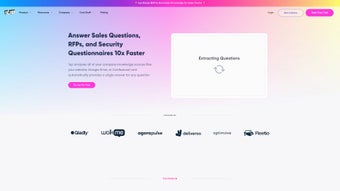

Download 1up – AI‑Powered RFP Automation Tool for Sales Teams
Overview: Why 1up Is Essential for Modern Sales Organizations
In a B2B landscape where every minute counts, responding to Requests for Proposals (RFPs) and security questionnaires can become a costly bottleneck. 1up eliminates that friction by combining large‑language‑model AI with secure data integration, turning a process that once required hours of manual copy‑pasting into a matter of minutes. The platform pulls information from cloud storage (Google Drive, SharePoint), internal knowledge bases, and even publicly available web content, then maps each question to the most relevant source. This results in answers that are not only fast but also verifiably accurate, complete with source citations for audit trails. Because 1up is delivered as a SaaS web application, updates, security patches, and new AI capabilities are rolled out automatically, keeping your team on the cutting edge without any extra effort.
The real value of 1up lies in the strategic freedom it creates. Salespeople can shift their focus from repetitive data retrieval to high‑impact activities such as relationship building, solution tailoring, and objection handling. Integrated Slack support means that even during a live sales call, a quick slash command can surface the exact compliance detail you need, preventing stalls and preserving momentum. In short, 1up acts as a productivity multiplier, reinforcing the modern sales stack while upholding rigorous data‑governance standards.
Key Features and Automation Capabilities
- AI‑Generated Answers: Merges generative AI with company‑specific data for precise, context‑aware responses.
- Multi‑Format Support: Handles Excel, Word, PDF, and web‑based questionnaires with automatic field mapping.
- Data Source Integration: Connects to Google Drive, SharePoint, internal wikis, and public web content via OAuth.
- Slack Chatbot: Real‑time assistance directly within Slack channels or DMs.
- Bulk Processing Engine: Upload entire folders of RFPs and receive hundreds of answers in seconds.
- Version Control & Audit Trail: Every answer is logged with its source document for compliance verification.
- Custom Templates: Save tone‑consistent answer structures that align with corporate branding.
- Role‑Based Permissions: Granular access controls protect sensitive data throughout the workflow.
The automation core of 1up uses a hybrid approach: a generative AI layer produces natural‑language text, while a rule‑based overlay enforces corporate policies, legal phrasing, and compliance mandates. When the AI confidence score falls below a configurable threshold, the system flags the answer for human review, preventing the dreaded “hallucinations” common in pure LLM solutions. This safety net ensures that every response is both accurate and audit‑ready.
Analytics are baked into the dashboard, offering insights such as average response time, most‑frequent question categories, and success rates per user. Managers can leverage these metrics to identify training opportunities, refine data sources, or adjust AI prompts, creating a feedback loop that continuously improves the RFP response process.
Installation, Usage & Compatibility
Because 1up is a cloud‑native SaaS platform, there is no traditional installation required. Users simply visit 1up.ai, register an account, and choose a subscription tier that matches their team size. After registration, administrators connect data sources using OAuth—Google Drive, Microsoft 365, or on‑premise file shares can be added in a few clicks. The platform is optimized for modern browsers (Chrome, Edge, Firefox, Safari) and works flawlessly on Windows 10/11, macOS 12+, Linux distributions, as well as iOS 13+ and Android 9+ via a responsive web interface.
The workflow is deliberately streamlined: drag‑and‑drop an RFP document into the upload pane, select the target format, and click “Generate.” Within seconds a preview displays AI‑crafted answers alongside source citations. Users can accept, edit, or reject each suggestion before exporting the final document back to its original format or sharing it directly via email or Slack. The Slack chatbot can also be invoked with a simple slash command (e.g., /1up answer security‑question) to retrieve instant guidance while you’re mid‑conversation.
Supported operating systems include Windows, macOS, Linux, iOS, and Android—all accessed through a web browser, ensuring that no additional client software is needed.
Pros & Cons
Pros
- Reduces RFP turnaround from days to minutes, accelerating sales cycles.
- High accuracy thanks to source‑linked answers and confidence‑based flagging.
- Seamless integration with Google Drive, SharePoint, Slack, and other cloud tools.
- Robust security model with AES‑256 encryption, role‑based access, and audit logs.
- Scalable pricing that fits startups, mid‑market, and enterprise organizations.
Cons
- Quality of generated answers depends on the completeness of connected data sources.
- Initial connector setup may require assistance from IT or data‑governance teams.
- Complex legal language sometimes needs a final human review to ensure nuance.
Frequently Asked Questions
How does 1up protect my data?
All data is encrypted at rest with AES‑256 and in transit using TLS 1.3. Role‑based access control limits visibility, and every generated answer includes a source reference for full auditability. 1up is SOC 2 Type II certified and complies with GDPR, CCPA, and HIPAA where applicable.
Can I use 1up for non‑sales questionnaires?
Yes. The AI engine works with any structured questionnaire—vendor risk assessments, compliance checklists, or internal audit forms—provided the relevant data sources are linked.
What subscription plans are offered?
1up provides three tiers: Starter (up to 5 users, limited uploads), Professional (unlimited users, priority support), and Enterprise (custom pricing, dedicated account manager, optional on‑premise deployment). All plans include continuous AI updates and security patches.
How does the Slack chatbot integrate with my workflow?
After installing the 1up Slack app, you can invoke the bot with a slash command (e.g., /1up answer security‑question). The bot queries the AI engine and connected data sources, returning concise answers or a direct link to the source document.
Is there a free trial available?
A 14‑day free trial with full feature access is offered to let teams evaluate speed, accuracy, and integration capabilities before committing to a paid plan.
Conclusion & Call to Action
For sales organizations battling endless RFPs and security questionnaires, 1up provides a decisive edge. Its AI‑driven automation shortens response times, boosts answer accuracy, and frees up valuable human capital for strategic selling. Robust security, multi‑format support, and seamless Slack integration make it a natural fit for any modern tech stack. Ready to turn your proposal process from a bottleneck into a high‑velocity engine? Start your free trial today and experience the productivity lift firsthand.
1up impresses with its speed and accuracy, making it an indispensable tool for fast‑moving sales teams. The only caveat is the initial data‑source setup, which can be a brief hurdle for larger enterprises.
Pros: Rapid automation, secure data handling, Slack bot, extensive format support.
Cons: Requires quality source data, occasional human tweak for legal nuance.



.png)



